ChatGPT in Shopify: How to Use AI Applications in Your E-commerce Store
Shopify integration with ChatGPT turned AI into an advisor, operator, and salesperson, enabling capabilities ranging from instant customer service and automated product content to full purchases completed directly in a chat.
This article explains the whole story:
- how this integration works today and the difference from using ChatGPT alone,
- when it brings real business value,
- how to prepare your Shopify store for AI,
- how to use AI applications in your Shopify store,
- prerequisites, limitations & risks.
How ChatGPT Shopify Integration Works Today?
Over the last several months, dozens of apps and automation layers have emerged, enabling AI to handle not only content creation but also store operations.
The key shift: ChatGPT now operates within Shopify, supporting products, customers, orders, and workflows.
We explain how it works below.
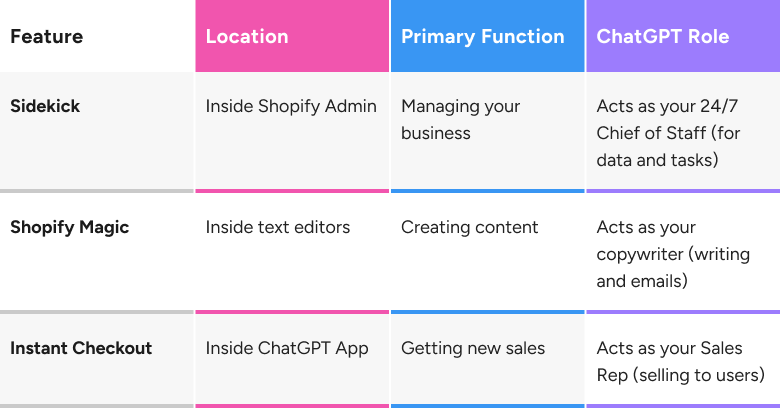
1. The Core Feature: Shopify Sidekick
Think of Sidekick as a version of ChatGPT with read/write access to your business data. It lives as a button in your Shopify admin panel.
How Does Shopify Sidekick Work?
- Context awareness: Unlike standard ChatGPT, Sidekick has access to your product catalog, sales data, customer context, and active theme settings.
- Action-oriented: It can perform tasks. You type a command in plain English, and Sidekick translates that into actions within the Shopify interface.
What Does Shopify Sidekick Do?
- Create a discount: You type "Put all winter coats on sale for 20% off," and Sidekick will draft the discount code, select the correct collection, and set the parameters for you to review.
- Analyze sales: You ask, "Why did sales drop last Tuesday?" Sidekick analyzes your analytics for that specific date, compares it to trends, and might suggest reasons (e.g., You had 40% less traffic from Instagram that day).
- Edit my store design: You say, "Change the homepage hero banner to look more festive." Sidekick can open the theme editor and apply design changes for your approval.
The key advantage: Shopify Sidekick operates directly on Shopify data — no exporting CSVs, no manual prompting, no copy-paste.
2. The Engine: Shopify Magic
Shopify Magic is the branding for the AI tools embedded across the entire platform, powered largely by OpenAI’s GPT models.
How Does Shopify Magic Work?
- Embedded generation: Instead of going to ChatGPT, copying text, and pasting it into Shopify, the AI is built into the text boxes in Shopify.
- Fields it powers:
- Product descriptions: It scans your product title and keywords to automatically generate SEO-friendly descriptions and metadata.
- Email marketing: It drafts newsletter campaigns based on the product you want to promote.
- Instant replies: It drafts responses to customer chats in Shopify Inbox based on your store policies.
- Build category and collection descriptions based on the products they relate to.
- Translate products to multiple languages while keeping the structure intact.
- Create blog post drafts tailored to your product range and target groups.
3. The Reverse Integration: Shopping inside ChatGPT
It is important to note a major 2025 update that works the other way around: Shopify operating within ChatGPT.
How Does Shopping in ChatGPT Work?
- Agentic commerce protocol: Shopify and OpenAI introduced a feature that allows ChatGPT (the consumer app) to access Shopify product catalogs directly.
- Instant checkout: If a user asks ChatGPT, "I need a gift for a coffee lover under $50," ChatGPT can recommend your products and display a buy button directly in the chat. The user can purchase your item without ever leaving ChatGPT, with the order flowing instantly into your Shopify admin.
- Other forms of help for customers: ChatGPT can also compare variants, explain differences, answer questions about size, availability, and delivery, and suggest the best options within budget.
However, it is worth noting that this feature requires preparation and, often, a specific activation on the merchant's end. We describe the details further on in the article: activating agentic commerce.
What Does This Mean for Stores?
- A new sales channel without building a new frontend.
- Fewer abandoned carts due to a frictionless purchase flow.
- Conversational buying instead of complex navigation.
- An experience similar to talking with a human assistant.
Agentic commerce merges consulting + recommendation + transaction into one step — and that’s why it’s so transformative.
Summary of Differences: Shopify Sidekick, Shopify Magic, and Shopping in ChatGPT
How Integration Differs From Using ChatGPT Alone?
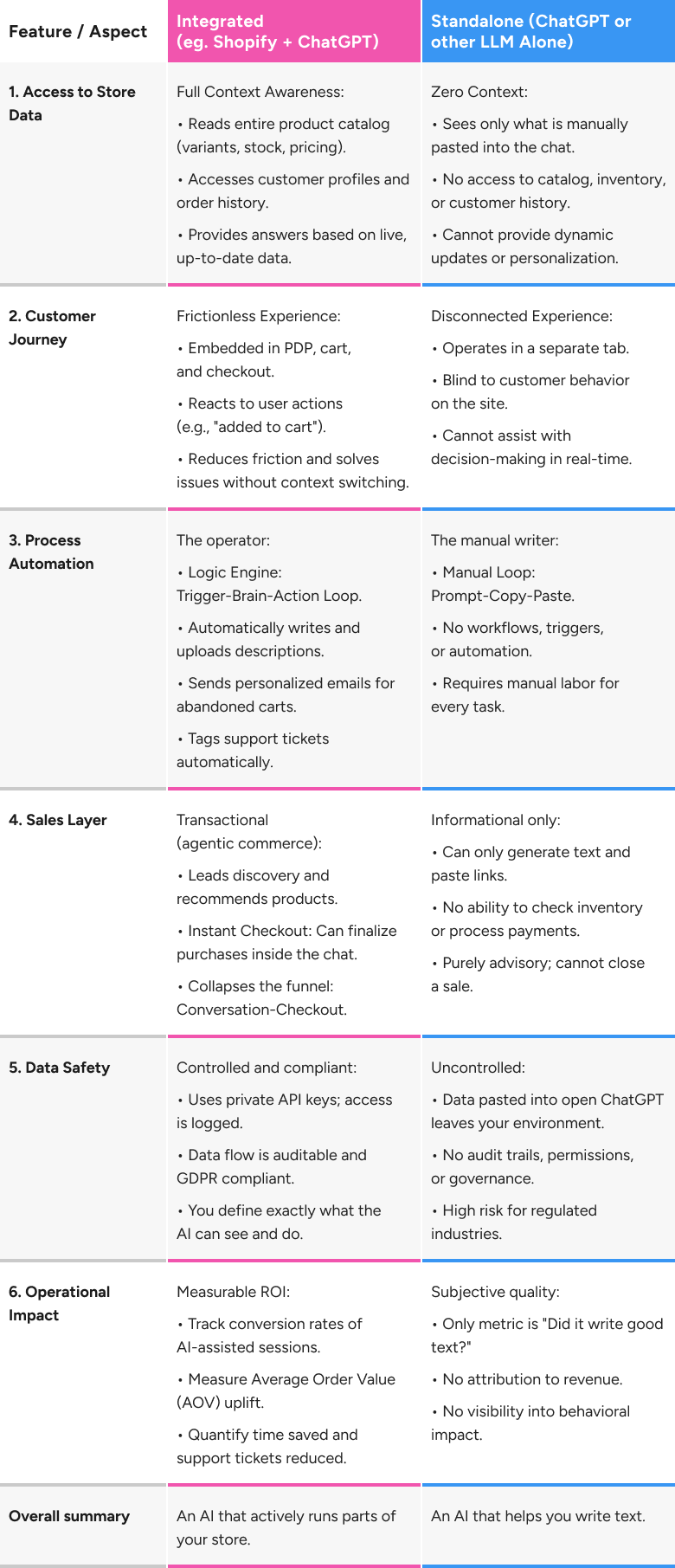
All differences between using ChatGPT as a simple tool versus as an integrated system are explained in the table below.
How to Use ChatGPT in Shopify Now?
You do not need to wait for a software update or hire a developer to start. The entry points are likely already waiting in your dashboard. Here is how to access the three main layers of intelligence today:
1. For Content Creation (Shopify Magic)
Go to any area in your Shopify Admin where you write text—product descriptions, blog posts, or Shopify Email campaigns. Look for the sparkle icon in the rich text editor toolbar.
- Action: Click the sparkles, enter 2-3 keywords, and select a tone. The built-in GPT engine will instantly generate the full copy for you to review.
2. For Store Management (Sidekick)
Look at the top-right corner or the sidebar of your Shopify Admin panel for the Sidekick icon (often stylized as a chat bubble with stars).
- Action: Click it to open the command panel. Instead of clicking through menus to find a setting, simply type what you need: "Hide all out-of-stock products" or "Start a 15% off flash sale for the weekend." Sidekick will prepare the action for your confirmation.
3. For External Analysis (The GPT Store)
If you have a ChatGPT Plus account, you can also navigate to the Explore GPTs section in ChatGPT and search for e-commerce analysis agents.
- Action: Use these external GPTs to analyze your public storefront. Paste your URL into the chat and ask: "Act as a critique. detailedly review my homepage user experience and suggest three changes to increase conversion." Since it can browse the web, it will analyze your live site and give you feedback as if it were a consultant.
Activating Agentic Commerce: What Merchants Need to Do
Agentic Commerce (Shopping in ChatGPT) requires preparation and, often, a specific activation on the merchant's end to ensure your products are visible and purchasable in the chat interface.
The foundation is the Agentic Commerce Protocol (ACP), an open standard that allows the AI to execute secure transactions with your store.
Here are the critical actions merchants must take:
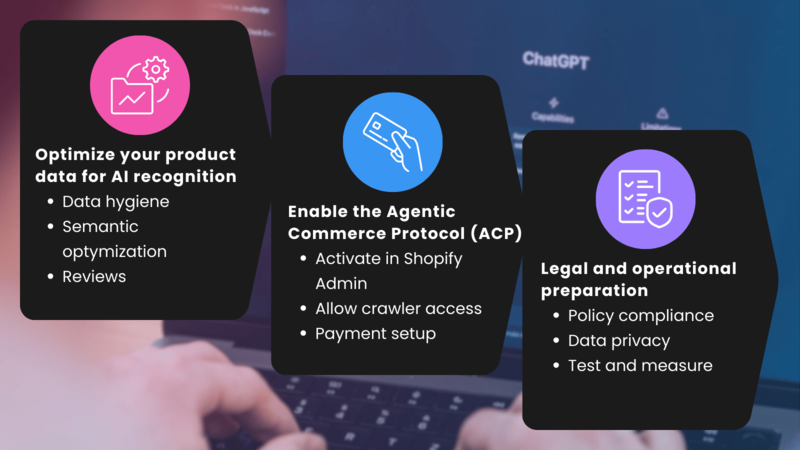
1. Optimize Your Product Data for AI Recognition
Clean data is especially important for Agentic Commerce, as the AI acts as a consultant, making real-time recommendations.
- Data hygiene: Ensure all product data is precise, accurate, and up to date. This includes detailed descriptions, accurate pricing, and, most importantly, real-time inventory levels to prevent the AI from selling an out-of-stock product.
- Semantic optimization: Products must be presented in a format that AI understands. Focus on using conversational and specific attributes, clear product titles, and a consistent tagging system to help the AI categorize and recommend your products correctly.
- Cultivate reviews: The AI considers product ratings and customer reviews when recommending products to users.
2. Enable the Agentic Commerce Protocol (ACP)
The technical integration with ChatGPT's Instant Checkout is managed via the Agentic Commerce Protocol.
- Activate in Shopify Admin: Many Shopify store owners can activate the ChatGPT checkout feature by toggling the switch in the sales channels or integrations section of their Shopify admin settings. This process is simplified through Shopify's partnership with OpenAI.
- Allow crawler access: Ensure your store's robots.txt file allows access to OAI-SearchBot. This web crawler is necessary for OpenAI to scan and index your product catalog so your items can be found in chat.
- Payment setup: Instant Checkout relies on secure payment processing. Using Stripe simplifies the process, as it is the most compatible payment gateway for the ACP. Merchants using other processors may need to integrate via the Delegated Payments Spec.
3. Legal and Operational Preparation
As the merchant remains the merchant of record, you retain full responsibility for the post-purchase experience.
- Policy compliance: Hard-code your return, refund, and shipping policies into the AI's system instructions to prevent confabulation (where the AI invents policies to please a customer).
- Data privacy: Update your privacy policy to disclose that AI conversation orders via ACP are a source of data. Be mindful that the customer relationship belongs to the merchant and that you must adhere to all privacy obligations.
- Test and measure: After implementation, conduct test purchases to confirm that order data appears correctly in your Shopify Admin, the refund/return flow works, and product catalog updates sync quickly.
This preparation transforms the AI from a simple recommender into a sales rep that completes the transaction directly inside the chat interface.
Contact us if you need help from a Shopify expert to prepare for activating agentic commerce.
The Fine Print: Prerequisites, Limitations & Risks
Before you dive in, it is vital to understand the constraints. AI is powerful, but it is not magic; it relies on specific technical foundations to work within Shopify.
1. Technical Prerequisites
You cannot just turn on Sidekick or agentic commerce on any store.
- Theme requirements: Shopify Sidekick deeply integrates with the visual editor, so it generally requires Online Store 2.0 themes (such as the Dawn version 11.0+).
- Data hygiene: AI models are only as smart as the data they are fed. If your product variants are messy (e.g., some are "Size: L" and others are "Size: Large"), the AI will fail to filter correctly. Clean data is the fuel for AI.
- Market availability: Some features (like Sidekick) roll out to specific regions (North America/English) first.
2. The Confabulation Risk
Generative AI acts like a confident intern—it will sometimes lie to you with total conviction.
- Inventory ghosts: In rare cases, if data sync lags, an AI agent might sell a product that is out of stock.
- Policy invention: If your Return Policy page is vague, the AI might invent a 30-day free return policy to please a customer, forcing you to honor it.
- Solution: Hard-code your policies into the AI’s system instructions (e.g., "NEVER authorize a return for items on sale").
3. The Generic Brand Trap
This is a strategic risk. If you use Shopify Magic to write all your product descriptions and emails, you sound like everyone else.
- The Trap: Default AI copy tends to be overly enthusiastic and riddled with clichés (e.g., "Elevate your style, unlock your potential").
- The Fix: Use AI for the first draft, but always have a human do the brand polish to ensure your unique voice remains intact.
How to Prepare Your Shopify Store for AI
Good preparation shortens implementation time and avoids operational issues. AI performs best when the store has clean data and defined processes.
Preparation steps:
- Check product data quality: AI needs accurate attributes, variants, and descriptions.
- Map your customer service and marketing workflows: Develop detailed maps of all the processes you want to automate so you can provide clear, step-by-step instructions.
- Choose one use case for the pilot: Start with a slight change so that if something goes wrong, it only affects a small part of the store.
- Define KPIs: AI should optimize for measurable outcomes, so define the indicators by which you will assess the usefulness of the solution you implement.
- Test, measure, iterate: Test on an ongoing basis, check KPIs, and incorporate conclusions in subsequent iterations.
When a Store Actually Benefits From ChatGPT Integration
This is not a one-size-fits-all technology. Its value grows with store complexity, traffic volume, and operational load.
AI creates an immediate impact where automation reduces workload, and personalization increases sales.
When is ChatGPT Integration the Most Beneficial?
For e-commerce businesses that:
- have many products (descriptions, translations, meta tags),
- receive many repeated questions,
- invest in personalization,
- run frequent marketing campaigns,
- struggle with abandoned carts,
- are exploring new sales channels,
- have a busy support team.
Summary
The shift to integrated AI
The article details how connecting ChatGPT to Shopify transforms the AI from a simple text generator into a business advisor, operator, and salesperson. This integration occurs through three primary tools:
- Shopify Sidekick: An admin-side assistant with access to business data that can analyze sales, draft discounts, and edit store designs via command prompts.
- Shopify Magic: Embedded AI tools within text editors that generate product descriptions, email campaigns, and instant customer replies.
- Agentic Commerce: A consumer-facing feature where ChatGPT users can discover products and complete purchases via an instant checkout button directly inside the chat interface.
Integrated vs. Standalone Use
The post emphasizes that integrated AI offers measurable operational advantages over using ChatGPT alone. While standalone ChatGPT has zero context and requires manual copy-pasting, integrated systems utilize a logic engine (Trigger-Brain-Action) to automate workflows, access live inventory data, and personalize the customer journey.
Implementation and Risks
To prepare for AI, merchants must ensure data hygiene (clean product attributes) and map out their workflows. Users can access these tools immediately via the sparkle icon for content or the Sidekick button for operations.
However, the article warns of specific risks, including technical prerequisites (requiring Online Store 2.0 themes), the potential for AI confabulation (e.g., inventing policies), and the danger of losing brand voice through generic AI copy.




